Featured image of post 全栈开发日志 Part.2

全栈开发日志 Part.2

Spring Boot:文件、拦截器

文件、拦截器

静态资源

SpringBoot默认会识别resources/static下面的文件,通过http://localhost:8080/xxx.jpg即可访问。

如果要修改静态资源的URL,参考下面的application.properties配置:

1
spring.mvc.static-path-pattern=/images/**

如果静态资源不在static路径下,参考:

1
spring.web.resources.static-location=classpath:/css

其中classpath指的是在jar包中Class文件所在的顶级目录。

resources文件夹下的目录会自动放到classes中。

文件上传

Tomcat限制了请求文件的大小,默认每个文件最大为1MB,单次请求的总数不大于10MB

参考如下参数自定义:

1
2
spring.servlet.multipart.max-file-size=10MB
spring.servlet.multipart.max-request-size=10MB

示例

对一个能接受文件上传的实验类实现如下:

 1
 2
 3
 4
 5
 6
 7
 8
 9
10
11
12
13
14
15
16
17
18
19
20
21
22
23
24
25
26
27
28
@RestController
public class FileUploadController {

    @PostMapping("/upload")
    public String up(String nickname, MultipartFile photo, HttpServletRequest request) throws IOException {
        System.out.println(nickname);
        //获取图片的原始名称
        System.out.println(photo.getOriginalFilename());
        //获取文件类型
        System.out.println(photo.getContentType());
        String path = request.getServletContext().getRealPath("/upload/");
        System.out.println(path);
        saveFile(photo,path);
        return "success";
    }

    public void saveFile(MultipartFile photo, String path) throws IOException {
        File dir = new File(path);
        //判断存储的目录是否存在,如果不存在则创建
        if(!dir.exists()){
            //创建目录
            dir.mkdir();
        }

        File file = new File(path+photo.getOriginalFilename());
        photo.transferTo(file);
    }
}

其中MultipartFile是接口,由Spring在编译的时候会自动挑选合适的实现类实例化,这里不是接口的直接实例化

如果需要兼容后续的SpringDoc-OpenAPI,upload方法需要有详细的注解:

 1
 2
 3
 4
 5
 6
 7
 8
 9
10
11
12
13
14
//加consumes = "multipart/form-data",声明接收文件格式
@PostMapping(value = "/upload", consumes = "multipart/form-data")
// 给参数加@RequestParam,明确必填(Swagger能识别)
public String up(@RequestParam String nickname, @RequestParam MultipartFile photo, HttpServletRequest request) throws IOException {
    System.out.println(nickname);
    //获取图片的原始名称
    System.out.println(photo.getOriginalFilename());
    //获取文件类型
    System.out.println(photo.getContentType());
    String path = request.getServletContext().getRealPath("/upload/");
    System.out.println(path);
    saveFile(photo,path);
    return "success";
}

Spring 注入 MultipartFile 的流程 Controller 中打印参数类型,就能看到实际实现类:

1
System.out.println(photo.getClass()); 

拦截器

  • 拦截器在Web系统中非常常见,对于某些全局统一的操作,我们可以把它提取到拦截器中实现。总结起来,拦截器大致有以下几种使用场景:

  • 权限检查:如登录检测,进入处理程序检测是否登录,如果没有,则直接返回登录页面。

  • 性能监控:有时系统在某段时间莫名其妙很慢,可以通过拦截器在进入处理程序之前记录开始时间,在处理完后记录结束时间,从而得到该请求的处理时间。

  • 通用行为:读取cookie得到用户信息并将用户对象放入请求,从而方便后续流程使用,还有提取LocaleTheme信息等,只要是多个处理程序都需要的,即可使用拦截器实现。

原理

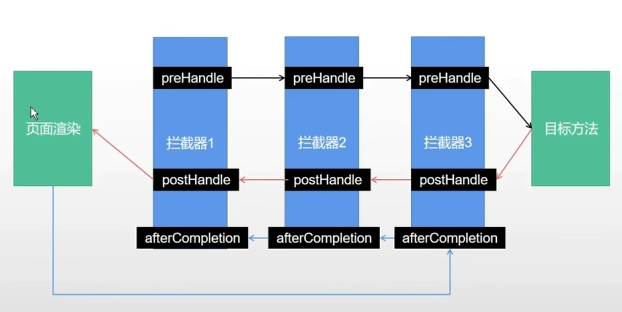
Spring Boot定义了Handlerlnterceptor接口来实现自定义拦截器的功能 Handlerlnterceptor接口定义了preHandlepostHandleafterCompletion 三种方法,通过重写这三种方法实现请求前、请求后等操作。
实现

下面是一个登录拦截器:

 1
 2
 3
 4
 5
 6
 7
 8
 9
10
11
12
13
public class LoginInterceptor implements HandlerInterceptor {    
    //在请求处理之前进行调用(Controller方法调用之前)
    @Override
    public boolean preHandle(HttpServletRequest request, HttpServletResponse response, Object handler) {
        if (条件){
            System.out.println("Pass");
            return true;
        } else {
            System.out.println("Fail");
            return false;
        }
    }
}

拦截器需要实现HandlerInterceptor接口,其还需要注册,方法如下:

1
2
3
4
5
6
7
8
@Configuration
public class WebConfigurer implements WebMvcConfigurer {
    //拦截器的注册
    @Override
    public void addInterceptors(InterceptorRegistry registry) {
        registry.addInterceptor(new LoginInterceptor()).addPathPatterns("/user/**");
    }
}

上面是一个配置类,需要实现WebMvcConfigure并加上注解@Configuration

  • addPathPatterns方法定义拦截的地址。

  • excludePathPatterns定义排除某些地址不被拦截。

  • 添加的一个拦截器没有addPathPattern任何一个url,则默认拦截所有请求。

  • 如果没有excludePathPatterns任何一个请求,则默认不放过任何一个请求。

本作品采用知识共享署名-非商业性使用-相同方式共享4.0国际许可协议进行许可(CC BY-NC-SA 4.0)
文章浏览量:Loading
Powered By MC ZBD Studio
发表了57篇文章 · 总计111.20k字
载入天数...载入时分秒...
总浏览量Loading | 访客总数Loading

主题 StackJimmy 设计
由ZephyrBD修改