Featured image of post 全栈开发日志 Part.8

全栈开发日志 Part.8

Vue.js:ElementUI、Axios、跨域问题

Vue.js:ElementUI、Axios、跨域问题

Element UI(Plus)

安装

1
npm install element-plus --save

当打开一个项目的时候,node_modules一般是不存在的,这里放置的是项目的依赖库,都可以下载到。

当项目目录下存在package.json的时候,在该目录下运行npm install即可补全依赖。

package.json中添加

1
2
3
4
"dependencies": {
  "element-plus": "^2.13.1",
  ...
}

ElementUI适用于Vue2Element Plus适用于Vue3

使用

修改main.js,参考如下:

1
2
3
4
const app = createApp(App)

app.use(ElementPlus)
app.mount('#app')

参考Overview 组件总览 | Element Plus中的代码使用。

Axios

简介

Axios是一个基于promise网络请求库,作用于node.js和浏览器中,其在浏览器端使用XMLHttpRequests发送网络请求,并能自动完成JSON数据的转换。

安装

1
npm install axios

package.json中添加

1
2
3
4
"dependencies": {
  "axios": "^1.13.4",
  ...
}

使用示例

发送GET请求

 1
 2
 3
 4
 5
 6
 7
 8
 9
10
11
12
13
// 向给定ID的用户发起请求
axios.get('/user?ID=12345')
  .then(function (response) {
    // 处理成功情况
    console.log(response);
  })
  .catch(function (error) {
    // 处理错误情况
    console.log(error);
  })
  .then(function () {
    // 总是会执行
  });
 1
 2
 3
 4
 5
 6
 7
 8
 9
10
11
12
13
14
15
// 上述请求也可以按以下方式完成(可选)
axios.get('/user', {
    params: {
      ID: 12345
    }
  })
  .then(function (response) {
    console.log(response);
  })
  .catch(function (error) {
    console.log(error);
  })
  .then(function () {
    // 总是会执行
  });

发送POST请求

 1
 2
 3
 4
 5
 6
 7
 8
 9
10
axios.post('/user', {
    firstName: 'Fred',
    lastName: 'Flintstone'
  })
  .then(function (response) {
    console.log(response);
  })
  .catch(function (error) {
    console.log(error);
  });

POST请求发送的东西会被写为json,后端需要用@RequestBody来接收。

其它请求方式

参考Axios 实例 请求配置 | Axios中文文档

与Vue结合

为了简化后续的URL地址,我们可以在main.js中配置:

 1
 2
 3
 4
 5
 6
 7
 8
 9
10
11
import axios from 'axios'

const app = createApp(App)

app.use(ElementPlus)
// 配置请求根路径
axios.defaults.baseURL = "http://localhost:8088"
// 将axios作为全局自定义属性(Vue3写法)
app.config.globalProperties.$axios = axios;

app.mount('#app')
  • mount()方法需在配置好全局属性后再调用。

  • $axios是自定义属性,后续通过this.$axios调用。

  • 这里的baseURL比较智能,末尾的/加不加都无所谓。

生命周期函数

Vue中,每个组件都有生命周期函数,在该组件运行到特定时候时会调用。

详细参考:生命周期选项 | Vue.js

  • 创建组件时运行:在export default中声明
1
2
created:function(){
}
  • 渲染完毕时运行:在export default中声明
1
2
mounted:function(){
}

Axios一般在mounted中使用,使用前需要import,除非做了配置。

示例

 1
 2
 3
 4
 5
 6
 7
 8
 9
10
11
12
13
14
15
16
17
18
19
20
<template>
</template>

<script>
import axios from 'axios';
export default {
  name: 'App',
  created:function(){
    axios.get("http://localhost:8088/user").then(function(response){
      console.log(response)
    })
  },
  mounted:function(){
    console.log("挂载完毕")
  }
}
</script>

<style>
</style>
  • 这里的created会失败,原因是跨域问题。

  • mounted的结果反而出现在created的错误信息前面,说明代码执行是异步的,不会停下来等待console.log(response)执行完毕。

跨域问题

为了保证浏览器的安全,不同源的客户端脚本在没有明确授权的情况下,不能读写对方资源,称为同源策略,同源策略是浏览器安全的基石。

  • 同源策略(Same-origin policy)是一种约定,它是浏览器最核心也最基本的安全功能。所谓同源(即指在同一个域)就是两个页面具有相同的协议(protocol),主机(host)和端口号(port)。

  • 当一个请求url的协议、域名、端口三者之间任意一个与当前页面url不同即为跨域,此时无法读取非同源网页的Cookie,无法向非同源地址发送AJAX请求。

CORS

  • CORS(Cross-Origin Resource Sharing)是由W3C制定的一种跨域资源共享技术标准,其目的是解决前端的跨域请求问题。

  • CORS可以在不破坏即有规则的情况下,通过后端服务器实现CORS接口,从而实现跨域通信。

  • CORS将请求分为两类:简单请求非简单请求,分别对跨域通信提供了支持。

简单请求

满足以下条件的请求即为简单请求:

  • 请求方法:GET、POST、HEAD。

  • 除了以下的请求头字段之外,没有自定义的请求头。

  • Accept、Accept-Language、Content-Language、Last-Event-ID、Content-Type。

  • Content-Type的值只有以下三种:text/plainmultipart/form-dataapplication/x-www-form-urlencoded

对于简单请求,CORS的策略是请求时在请求头中增加一个Origin字段:

1
2
3
Host: localhost:8080
Origin: http://localhost:8081
Referer: http://localhost:8081/index.html

服务器收到请求后,根据该字段判断是否允许该请求访问,如果允许,则在HTTP头信息中添加Access-Control-Allow-Origin字段:

1
2
3
4
Access-Control-Allow-Origin: http://localhost:8081
Content-Length: 20
Content-Type: text/plain; charset=UTF-8
Date: Thu, 12 Jul 2018 12:51:14 GMT

非简单请求

对于非简单请求的跨源请求,浏览器会在真实请求发出前增加一次OPTION请求,称为预检请求。

预检请求将真实请求的信息(请求方法、自定义头字段、源信息)添加到HTTP头信息字段中,询问服务器是否允许这样的操作。

例如一个GET请求:

1
2
3
4
5
OPTIONS /test HTTP/1.1
Origin: http://www.test.com
Access-Control-Request-Method: GET
Access-Control-Request-Headers: X-Custom-Header
Host: www.test.com
  • Access-Control-Request-Method表示请求使用的HTTP方法。

  • Access-Control-Request-Headers包含请求的自定义头字段。

服务器收到请求时,需要分别对OriginAccess-Control-Request-MethodAccess-Control-Request-Headers进行验证,验证通过后,会在返回HTTP头信息中添加:

1
2
3
4
5
Access-Control-Allow-Origin: http://www.test.com
Access-Control-Allow-Methods: GET, POST, PUT, DELETE
Access-Control-Allow-Headers: X-Custom-Header
Access-Control-Allow-Credentials: true
Access-Control-Max-Age: 1728000
  • Access-Control-Allow-MethodsAccess-Control-Allow-Headers:真实请求允许的方法、允许使用的字段。

  • Access-Control-Allow-Credentials:是否允许用户发送、处理cookie

  • Access-Control-Max-Age:预检请求的有效期,单位为秒,有效期内不会发送预检请求。

在SpringBoot中实践

添加配置类:

 1
 2
 3
 4
 5
 6
 7
 8
 9
10
11
12
@Configuration
public class CorsConfig implements WebMvcConfigurer {
    @Override
    public void addCorsMappings(CorsRegistry registry) {
        registry.addMapping("/**")   // 允许跨域访问的路径
                .allowedOrigins("*") // 允许跨域访问的源
                .allowedMethods("POST", "GET", "PUT", "OPTIONS", "DELETE")  // 允许请求方法
                .maxAge(168000)  // 预检间隔时间
                .allowedHeaders("*")  // 允许头部设置
                .allowCredentials(true); // 是否发送 Cookie
    }
}

高版本把allowedOrigins换成allowedOriginPatterns

特别的:你也可以在某个控制器类上加@CrossOrigin注解。

实际案例

基于以上所有内容:对后端查询出来的用户表的显示的实现。

 1
 2
 3
 4
 5
 6
 7
 8
 9
10
11
12
13
14
15
16
17
18
19
20
21
22
23
<template>
 <el-table :data="tableData" stripe style="width: 100%">
    <el-table-column prop="Age" label="Age" width="180" />
    <el-table-column prop="Contact" label="Contact" width="180" />
    <el-table-column prop="Name" label="Name" />
  </el-table>
</template>

<script>
import axios from 'axios';
export default {
    created:function(){
        axios.get("http://localhost:8088/user").then((response)=>{
            this.tableData = response.data
        })
    },
    data(){
        return {
            tableData: []
        }
    }
}
</script>

作用域问题(普通function vs 箭头函数)

  • 问题代码:

    1
    2
    3
    4
    5
    6
    
    created:function(){
        axios.get("http://localhost:8088/user").then(function(response){
            console.log(response.data) // 这行能正常执行
            this.tableData = response.data // 这行无法生效,甚至会报错
        })
    }
    
  • 正确的箭头函数写法:

    1
    2
    3
    4
    5
    
    created:function(){
        axios.get("http://localhost:8088/user").then((response)=>{
            this.tableData = response.data // 能正常生效
        })
    }
    

问题根源:普通functionthis是「动态绑定」,指向发生了改变。

  • created钩子函数内部(外层),this的指向是Vue 组件实例this.tableData指向响应式数据。

  • then的回调函数中,使用普通function,其是由axios内部调用的,而非 Vue 组件实例调用。函数内部的this指向发生了改变,不再指向 Vue 组件实例

  • 箭头函数没有自己的this,它不会创建自己的执行上下文,内部的this继承自它定义时所在的外层作用域的this

  • 箭头函数定义在created钩子函数内部,外层created钩子的this指向 Vue 组件实例,因此箭头函数内部的this也会继承这个指向,依然指向 Vue 组件实例

箭头函数普及前的常用写法

  • 提前保存外层this

    1
    2
    3
    4
    5
    6
    7
    8
    
    created:function(){
      // 保存Vue组件实例的this到一个变量,供内层函数使用
      const _this = this;
      axios.get("http://localhost:8088/user").then(function(response){
          // 用_this访问Vue组件实例的tableData,不再依赖内层函数的this
          _this.tableData = response.data;
      })
    }
    
  • 使用bind()方法绑定this

    1
    2
    3
    4
    5
    
    created:function(){
        axios.get("http://localhost:8088/user").then(function(response){
            this.tableData = response.data;
        }.bind(this)) // 把外层Vue组件实例的this,绑定到内层普通函数上
    }
    

渲染效果:
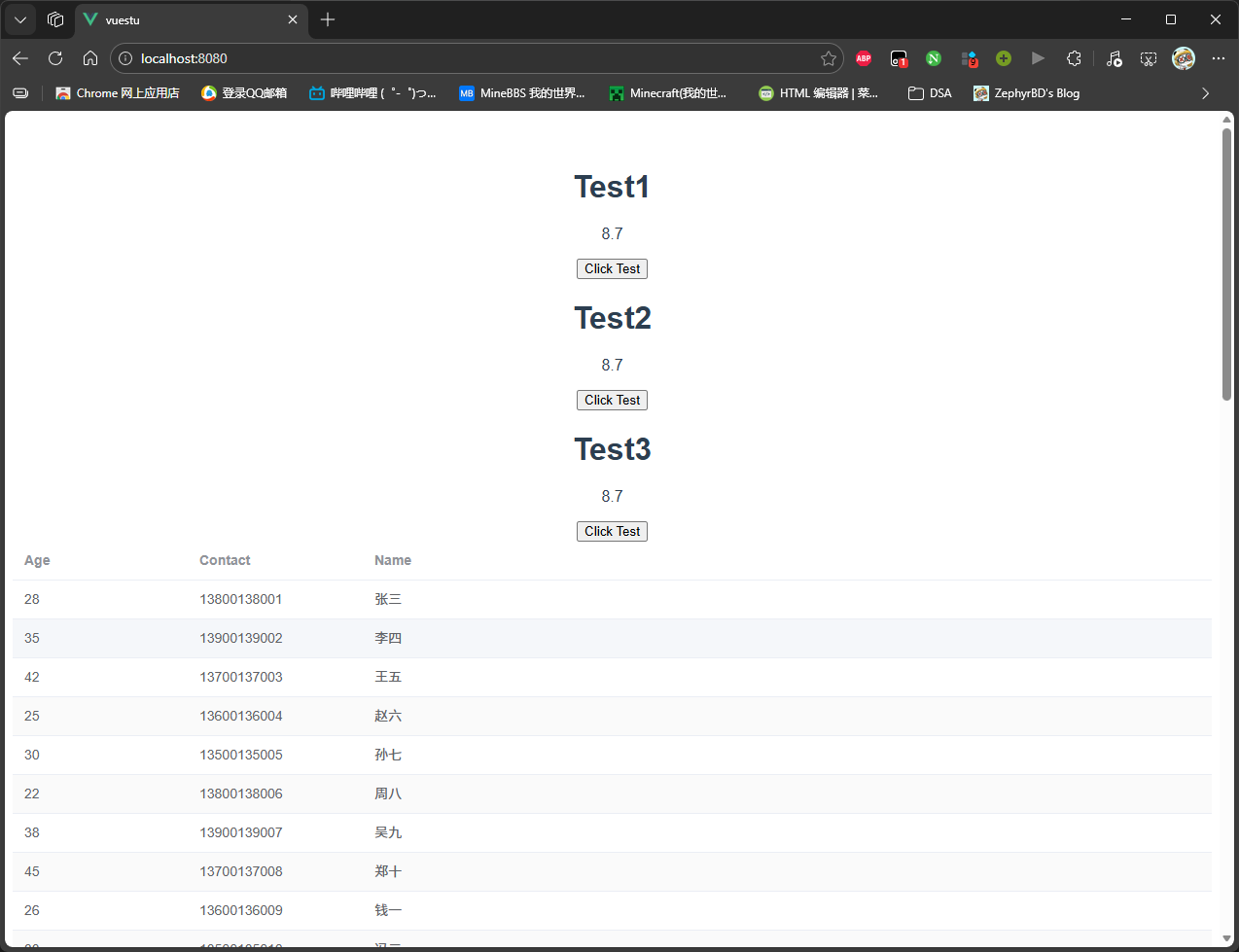
至此,我们初步打通了前后端。

本作品采用知识共享署名-非商业性使用-相同方式共享4.0国际许可协议进行许可(CC BY-NC-SA 4.0)
文章浏览量:Loading
Powered By MC ZBD Studio
发表了57篇文章 · 总计111.20k字
载入天数...载入时分秒...
总浏览量Loading | 访客总数Loading

主题 StackJimmy 设计
由ZephyrBD修改